Introduction
Download the Sketchup (skp) file of the MH 2 Window Module here: http://opensourceecology.org/wiki/File:M...
Use the scene tabs at the top in the model to see the various steps in the assembly, the full module, or the cut pieces.
-
-
Take a look at the full window module so that you are familiar with what you are about to build.
-
-
-
Create the plywood pieces for the module.
-
Begin by ripping the 5/8" plywood into 12" wide strips on the table saw.
-
Then, cut your strips to length as shown in the image.
-
The four strips shown in the image are for one module. Since we'll be building two modules, you will need to make two sets of these pieces.
-
-
-
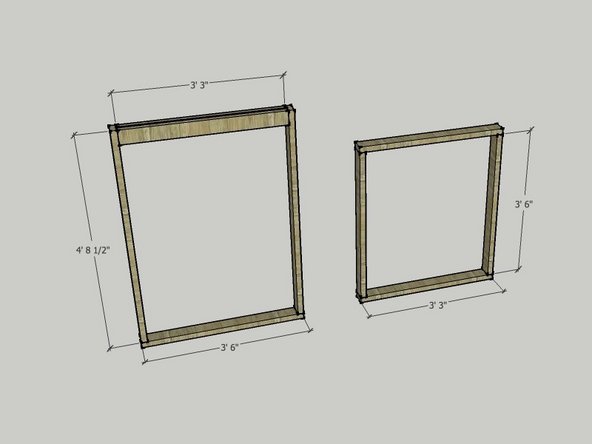
The image shows the dimensions of the various framing pieces.
-
CUT LIST for 2x4s:
-
2 @ 4' - 8 1/2"
-
3 @ 3' - 6"
-
4 @ 3' - 3"
-
Since you are making two of these modules, make a second set of the pieces listed above.
-
Helpful note: write the length of the pieces on them! This way you know you are using the right pieces as you assemble the unit.
-